Comment Rate Calculator
Put the conversation in context. Enter the comments or replies and views for the same video or post.
Enter your numbers to see the result.
How the calculation works
Comment rate by views divides the comment count (replies on Twitter / X) by total views. One person can comment more than once, and views may include repeats. This is a count-based ratio, not the percentage of unique viewers who commented. Follower-based comment rate and comments as a share of engagements are different methods, covered in the existing Instagram guide below.
A video has 100 comments and 25,000 views. 100 ÷ 25,000 × 100 = 0.40%.
Use counts for the same post and the same measurement period. Enter zero only when a metric is genuinely zero, not when it is unavailable. This tool does not assign a “good,” “bad” or “viral” benchmark.
See which posts start a conversation.
Review public views, likes, comments and account-level trends in Watchlist. Use Trend Finder to find videos and posts that outperform their account’s baseline, then open the originals to understand what prompted a response. Counts alone cannot explain the quality of a conversation.
Track public Instagram, TikTok, YouTube and X accounts. Active accounts are scanned daily; accounts quiet for 14 days or more are checked weekly.
Track performance automatically with Statly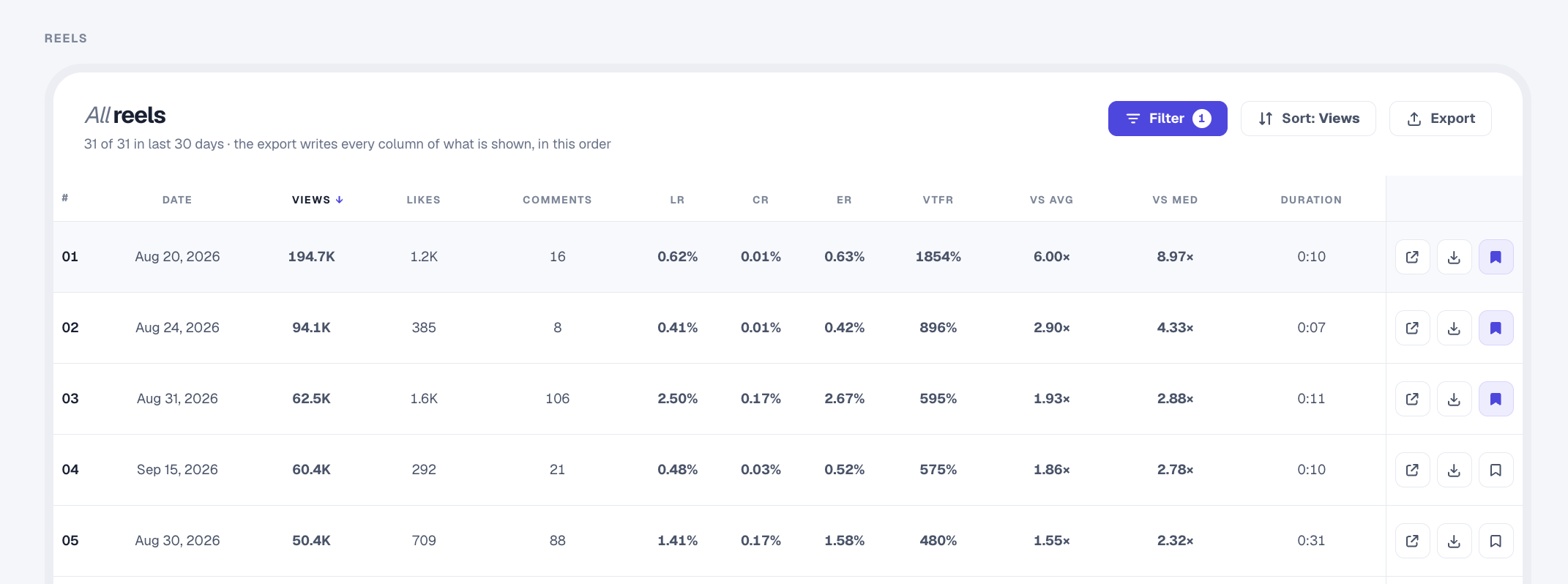
Questions about this rate
Do I enter replies for Twitter / X?
Yes. The platform selector changes the label to Replies. The formula is replies divided by views, multiplied by 100.
Can one person contribute several comments?
Yes. Comment counts are not unique commenter counts. This rate does not tell you how many different people responded.
Is this comments divided by followers?
No. This calculator uses views. The Instagram guide below explains the separate follower-based method and comment share.
Does choosing a platform fetch account data?
No. You enter every number yourself. The platform selector changes labels and examples only; it does not connect to a platform or look up an account.
Are these calculators free?
Yes. No signup is required. Calculations happen in your browser, without AI or an external data API.
What is a good rate?
There is no universal threshold here. Compare posts with the same formula, time window and included metrics, and consider the account’s own usual performance.
Read the existing Instagram comment-rate guide (follower-based method)
Instagram Comment Rate: How to Calculate It and What Counts as Good (2026)
Why comment rate matters more than it looks
A like is a reflex. A comment is a decision. Someone has to stop, think of something to say, and type it. That extra effort is exactly why comment rate is a sharper read on audience quality than like rate or raw engagement.
It is also harder to fake convincingly. Anyone can buy a block of likes. A wall of real, on-topic comments is a much better sign that an audience actually cares. When a creator has a high like rate but a near-zero comment rate, that gap is worth a closer look.
There is one honest complication in 2026: a lot of genuine engagement has moved out of the public comment section. Recent benchmark data shows that private sharing through DMs has overtaken public commenting as the way people react to content they love. So a modest comment rate today does not mean an audience is disengaged. It means some of the conversation is happening where you cannot see it. Read comment rate as a floor on engagement, not a ceiling.
The two formulas
By followers (most common, works on any public account):
comment rate = average comments per post / followers × 100
By engagement (comments as a share of total interaction):
comment share = comments / (likes + comments) × 100
The first tells you how much of the audience comments. The second tells you how conversational the engagement is: a high comment share means the content sparks discussion rather than passive taps. Both are useful. The follower-based version is the one people mean when they say "comment rate."
Worked example: An account has 40,000 followers. Across its last 12 Reels, comments total 2,400, so average comments per post is 200. Comment rate is 200 / 40,000 × 100 = 0.5%. On the benchmark scale above, that is right at the average line.
How to check any account's comment rate manually
- Note the follower count on the public profile.
- Pick a sample of at least the last 10 to 12 posts.
- Record the comment count shown on each post.
- Average them. Total comments divided by the number of posts.
- Divide by followers and multiply by 100.
Why the manual method falls short
- Comment counts are noisy. One post with a "tag a friend" prompt or a giveaway can carry ten times the comments of a normal post. Without a large sample, one such post wrecks your average.
- It is slow to repeat. Tracking comment rate over time, or across competitors, means redoing the whole count on a schedule. Nobody sustains that by hand.
- You cannot separate real from bait. By eye, a giveaway's "done!" comments look the same as genuine discussion. You need to see comment rate next to like rate and views to judge whether conversation is real.
- Reels change the baseline. Reels reliably drive more comments than static posts, so mixing formats in one hand-count muddies the number.
How to see comment rate in one click with Statly
Statly is a web app, with an optional Chrome extension, that calculates comment rate for you on any public profile. No Instagram login needed: it reads publicly visible comment counts and follower data, then does the math for you.
- Watchlist shows CR per Reel. Statly's Watchlist table includes a dedicated CR (Comment Rate) column for every Reel, sitting right next to like rate (LR), engagement rate (ER), and View-to-Follower Ratio, so you can spot the like-heavy-but-quiet posts at a glance.
- Audit sorts by Comments. Sort every Reel in an Audit by Comments to surface an account's most conversation-driving content instantly.
- Real sample size. Statly scans up to the last 300 Reels or 180 days, so one giveaway post cannot distort the picture the way it does in a 10-post hand count.
- Export to spreadsheet. Keep your own comment-rate records over time.
The free preview, 500 videos for 3 days with no card, is enough to check comment rate on the accounts you care about before you pay.
What is a good Instagram comment rate?
Benchmarks are directional and shift with size and niche. As a working scale drawn from current 2026 data:
- Under 0.5%: weak. Little conversation, or an audience that is cold or padded.
- 0.5% to 1%: average. Roughly where a typical account sits.
- 1% to 3%: good. The content is prompting real responses.
- 3% and above: excellent, though watch for giveaway or "comment to enter" inflation at the top end.
Two things shape where an account lands. First, size: like every engagement metric, comment rate tends to fall as follower count climbs, because smaller, tighter audiences talk more per follower. Second, format: Reels consistently spark more comments than static posts, and that effect grows with account size.
The most useful benchmark is still the account's own history and its direct competitors, not a universal figure. A fitness creator and a B2B software brand live in different worlds, and comparing them is a fast way to draw the wrong conclusion. Statly's Compare and Watchlist views exist to make the like-for-like comparison instead.
Frequently asked questions
What is a good comment rate on Instagram? As a rough scale: under 0.5% is weak, 0.5% to 1% is average, 1% to 3% is good, and 3% or higher is excellent. It varies with account size and niche, and Reels tend to earn more comments than static posts.
How is comment rate different from engagement rate? Engagement rate combines likes and comments relative to audience size. Comment rate isolates comments alone. Because commenting takes more effort than liking, comment rate is a stronger signal of genuine interest.
Why does a high like rate but low comment rate happen? It usually means content is easy to approve of but not compelling enough to respond to, or that some engagement has moved to DMs and shares. A large gap between the two can also, in some cases, hint at purchased likes.
Do giveaways improve comment rate? They inflate it temporarily. Contest and "comment to enter" posts can pull far more comments than normal, which skews any average that includes them. That is why a large, format-aware sample gives a truer comment rate than a handful of posts.
See the comment rate on any profile in one click
Find the outliers on any account, with a free preview: 500 videos for 3 days, no card needed.